


One engineer, three faculties.
It is not three tools. It is one virtual Kubernetes engineer, split across three ports only to keep each surface uncluttered. You converse with it; it acts on its own; and it gets measurably better at your cluster over time.
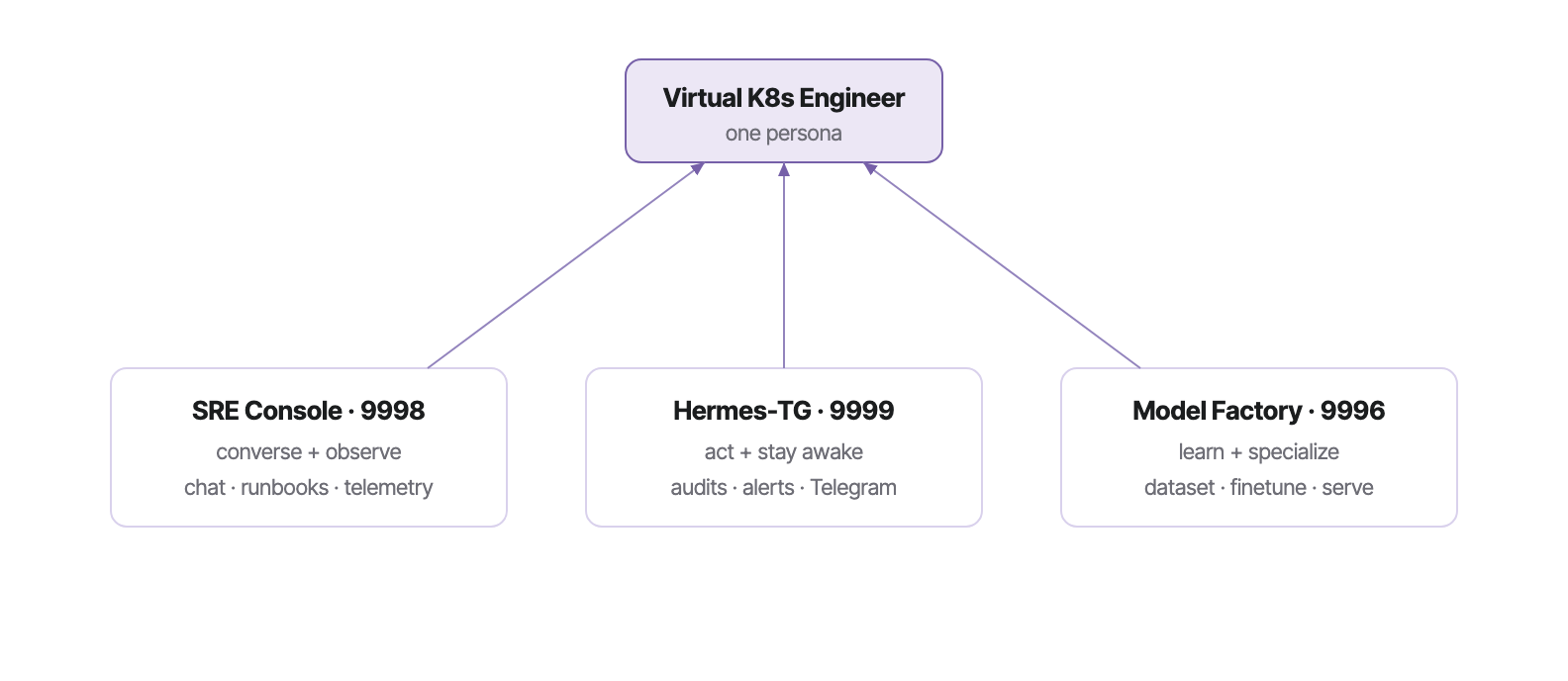
The differentiator is not the chat — plenty of tools chat about Kubernetes. It is that this engineer observes (9998), acts (9999), and retrains on its own incident history (9996), becoming a specialist in your cluster rather than a generic model. That closed loop is covered in The closed learning loop.
The console & sidebar.
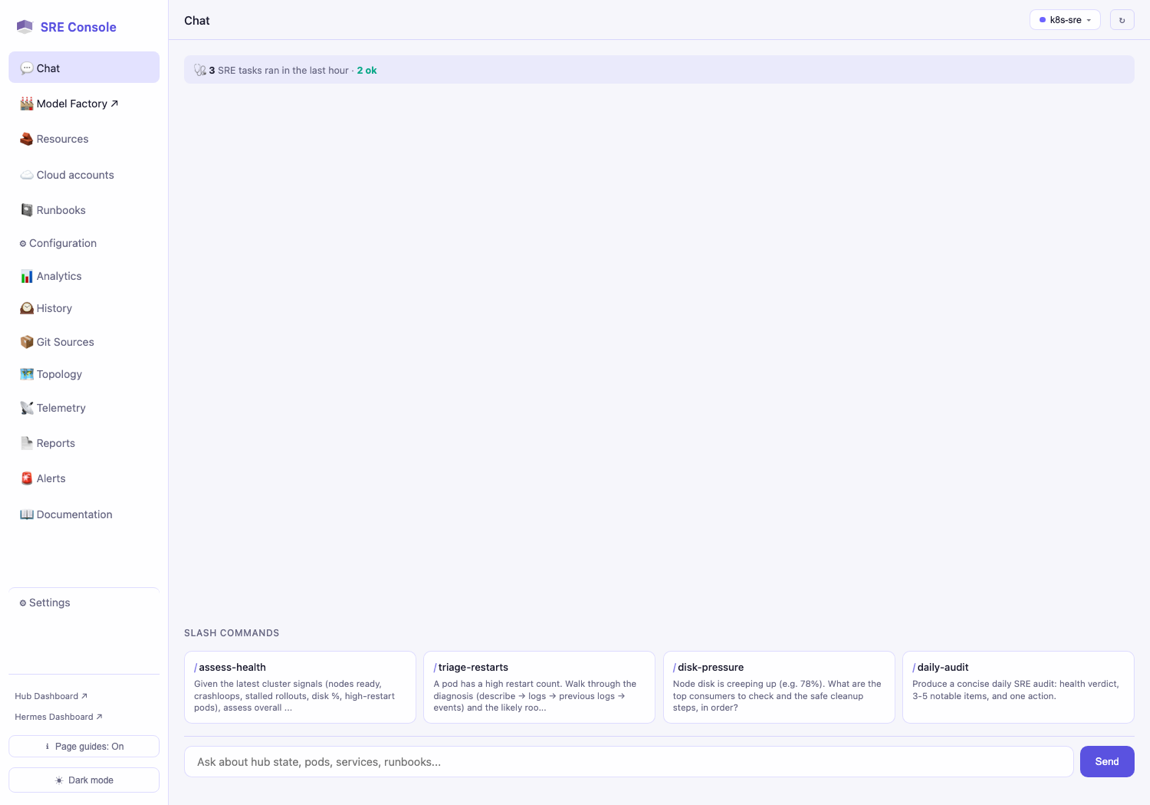
The conversational front. You ask in plain English; every turn is grounded in a live cluster snapshot. The model answering is selectable — including the Factory's own finetunes.
§Chat — the cluster-aware agent
The Chat pane injects a live snapshot (nodes ready, pod phases, restart counts, pending pods, top-memory pods) ahead of your question, so answers reason from real signals. Type plain English, or click a slash-command card.
§The panes
| Pane | What it does |
|---|---|
| Chat | Cluster-aware conversational agent (predictive — reasons from live signals). |
| 🏭 Model Factory ↗ | Opens the Factory (9996) in a new tab — the SRE's model-support port. |
| Resources | Live K8s / PM2 / Helm control surface. |
| Cloud accounts | Multi-cloud credential & resource discovery. |
| Runbooks | Executable per-resource remediation (RunWhen SLX). |
| Topology | Cluster graph from discovery. |
| Telemetry | Logs + compute metrics via ClickHouse / OTel. |
| History | SQLite audit store — every state-changing op (the loop's raw material). |
| Analytics · Reports · Alerts | Health snapshots & improvement proposals · printable incidents · rule-based watchdog. |
| Settings | Provider config, playbook roles, theme (defaults to light). |
§The model dropdown & per-model personas
The top-right dropdown is provider-aware: it probes Ollama, LM Studio, Claude Max, LiteLLM — and the Model Factory (9996/v1/models). Every finetune the Factory serves shows up as a distinct entry under the <domain>-sre naming convention.
Selecting a Factory model swaps both the system prompt and the chat cards:
| Model | Persona & cards when selected |
|---|---|
| k8s-sre | Cluster-SRE prompt; cards: assess-health, triage-restarts, disk-pressure, daily-audit. |
| insurance-sre | Underwriting prompt; cards: triage-claim, explain-risk, premium-band, audit-cohort. |
k8s-sre yields on-domain cluster answers; insurance-sre yields underwriting answers — same endpoint, correct persona each time.Tabs & the stable endpoint.
The model lifecycle, decoupled from the SRE: build a dataset, finetune it on burst GPU, serve the result on a stable endpoint the SRE consumes. Re-finetuning hot-swaps the weights — the URL and the dropdown entry never change.

| Tab | Purpose |
|---|---|
| 🎬 Insurance Demo | Landing tab — the end-to-end story, live. |
| 🧪 Datasets | Synthetic · BigSet · SRE-history sources + registry. |
| 🔁 Finetune | RunPod burst, spend-gated, persists adapter + job ledger. |
| 📦 Models | Multi-alias serving registry behind the stable /v1. |
| ⏱️ Scheduler | Dataset + base model + cadence; on-demand & Telegram retrain. |
| 💬 Playground | Chat / compare base vs finetuned. |
§The stable, multi-alias endpoint
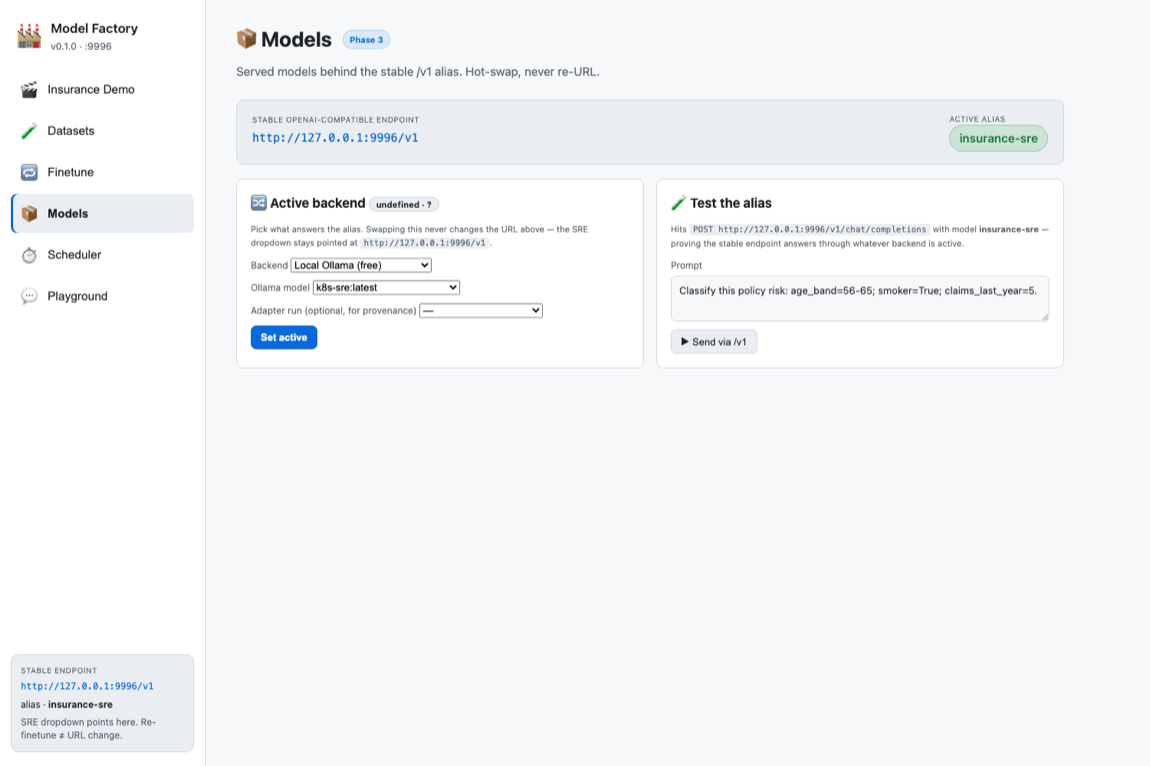
# one URL, many models, never re-URLs on retrain
GET http://hub:9996/v1/models # → k8s-sre (default), insurance-sre
POST http://hub:9996/v1/chat/completions {"model":"k8s-sre", "messages":[...]}
§Datasets
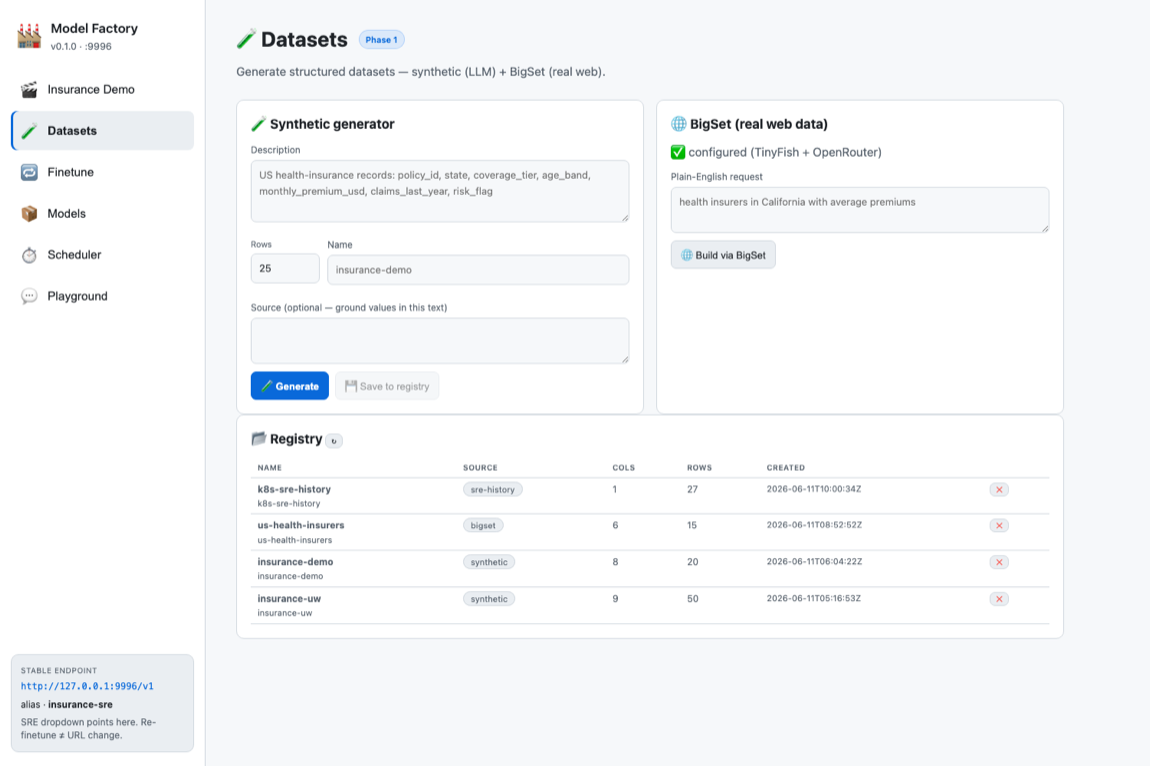
Three sources feed one registry:
a.Synthetic
An LLM (OpenRouter, Ollama fallback) turns a plain-English description into a structured CSV. Controlled, repeatable — ideal for demos.
b.BigSet (real web data)
Self-hosted TinyFish BigSet (ports 3500/3501) researches the live web and returns a verified, source-attributed table. Used to build the us-health-insurers set (15 real insurers).
c.SRE-history
The cluster's own record — /api/history events plus daily audit summaries and published reports — converted to training rows. This is what makes the loop close.
§Finetune — burst, persist, serve
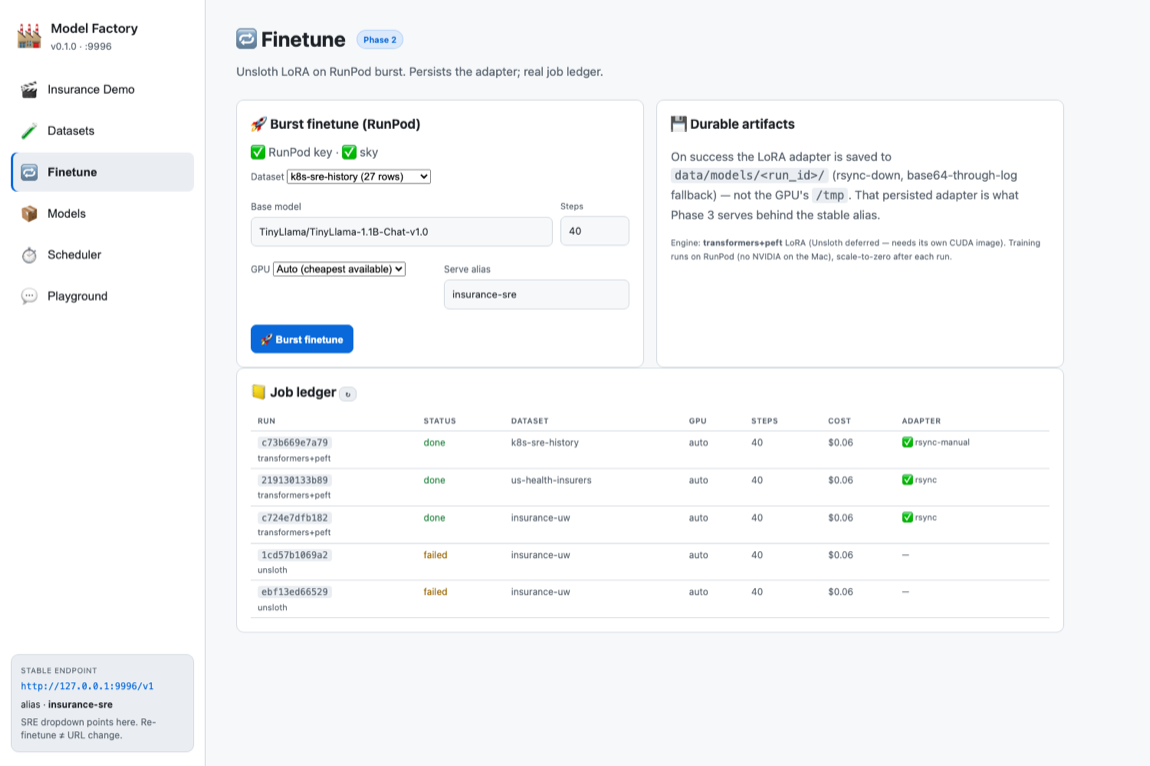
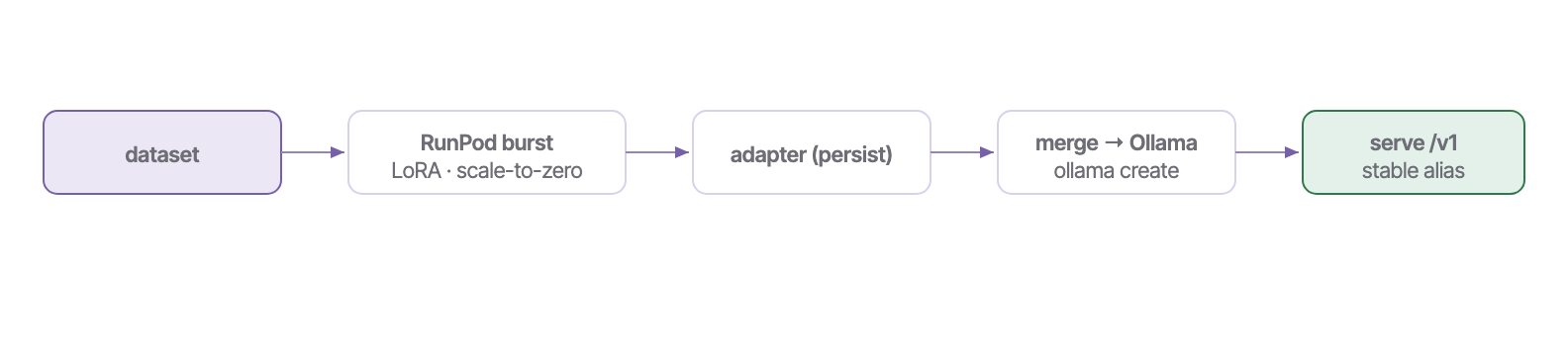
insurance-uw (loss 1.47), us-health-insurers (loss 1.78), k8s-sre (loss 3.22). ~$0.06/run, every GPU torn down. Total build spend ≈ $0.21.§Scheduler — keep the model fresh
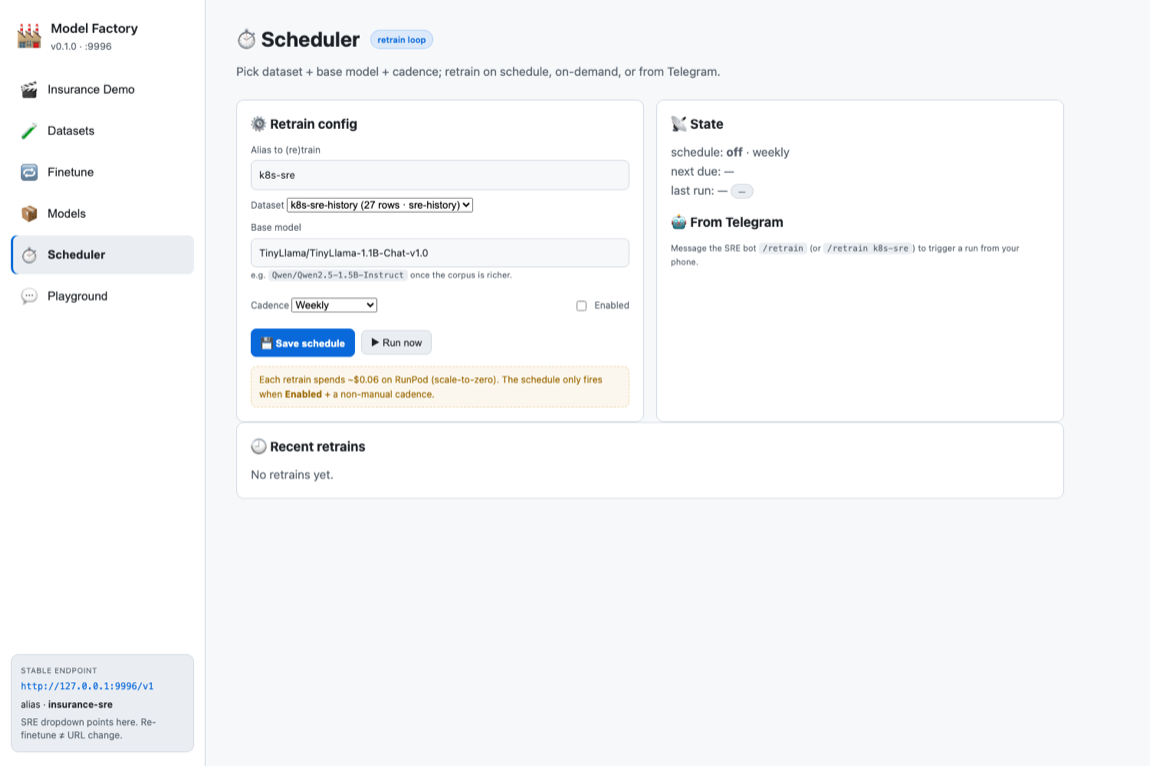
The Scheduler owns the retrain knobs: alias, dataset (dropdown from the registry), base model (swap to Qwen/Qwen2.5-1.5B-Instruct when the corpus is rich), and cadence (manual / 6h / 12h / daily / weekly) with an Enabled toggle. Each fire rebuilds+enriches the corpus, finetunes, and hot-swaps behind the alias.
Autonomous SRE & Telegram.
The faculty that acts on its own and reaches your phone: scheduled audits, report generation, and a two-way chat surface.
§Autonomous SRE
Hermes drives scheduled work via cron writers (daily-audit.sh, daily-report.sh): a deterministic cluster snapshot, summarized by the Console's model, written to the audit log + a saved HTML report, and pinged to Telegram.
§Two bots, two directions
| Bot | Where | Direction · role |
|---|---|---|
| Telegram bot (VPS) | VPS | Outbound — daily audits + report links (production). |
| Telegram bot (hub) | Hub · 9998 | Inbound — chat the SRE agent from your phone. One poller per token (DKUBE_SRE_TELEGRAM_BOT=1). |
§Commands
Plain English routes to the cluster-aware agent. Slash commands map to the active model's cards. And:
/retrain # retrain the default alias
/retrain k8s-sre # retrain a specific model — hot-swaps behind its alias when done
/assess_health /triage_restarts /disk_pressure /daily_audit
The closed learning loop.
Most assistants are read-only or generic. This one feeds its own operational record back into training — so it specializes in your cluster, and improves every retrain.
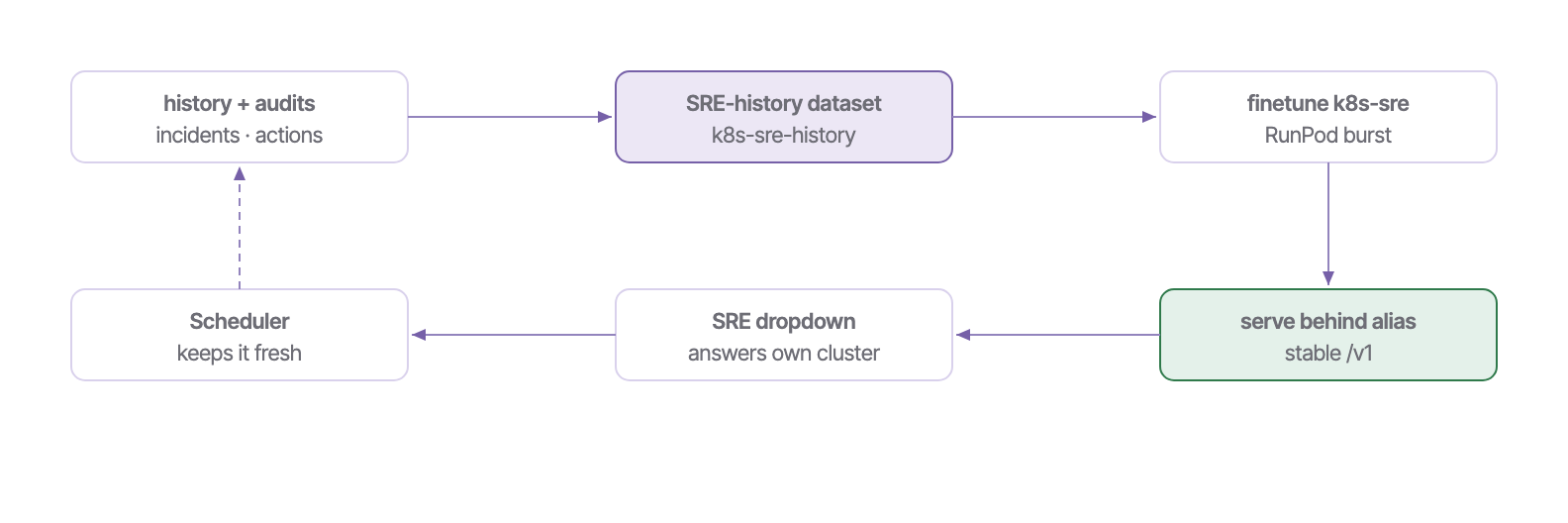
k8s-sre model, trained on the cluster's own audit history, answers cluster-health questions on-domain (disk I/O, pod restarts) through the SRE dropdown — the loop closed end-to-end.Procedures — how do I…
1 · Build a dataset (synthetic or real)
- Open Model Factory → Datasets.
- Synthetic: describe the schema (“US health-insurance underwriting: policy_id, state, …”), set rows, Generate, then Save to registry.
- Real (BigSet): type a plain-English request and Build via BigSet (2–5 min of live web research). It lands in the registry.
2 · Train the cluster's own model (close the loop)
- Datasets → build the SRE-history dataset (pulls
/api/history+ audit summaries + reports). - Finetune → pick that dataset → Burst finetune → confirm the ~$0.06 spend.
- On completion the adapter is merged and served behind
k8s-sreautomatically.
3 · Make a model selectable in the SRE
- Serving registers the alias on the stable endpoint (
/api/serve/register) — automatic after a finetune. - In the SRE, open the top-right dropdown → Model Factory group → pick the model by name.
- The chat persona + cards switch to that model's domain.
4 · Schedule retrains (or trigger from Telegram)
- Scheduler → set alias, dataset, base model, cadence → toggle Enabled → Save schedule.
- Or hit Run now for a one-off.
- From your phone: message the SRE bot
/retrain k8s-sre.
5 · Graduate the base model
- When the corpus is rich, set the Scheduler's Base model to
Qwen/Qwen2.5-1.5B-Instruct(or setRETRAIN_BASE_MODEL). - Run a retrain — the better model hot-swaps behind the same alias; no SRE reconfig.
Ports, deploys, env & API.
§Port map
| Port | Service | Notes |
|---|---|---|
| 9998 | SRE Console (native) | Converse + observe · light theme default |
| 9997 | SRE Console (docker) | Same code, container (host→9998 inside) |
| 9999 | Hermes | Autonomous SRE |
| 9996 | Model Factory | Datasets · finetune · serve · scheduler |
| 3500/3501 | BigSet | Self-hosted dataset builder |
| <sre-host> | VPS SRE | Production demo + Telegram bot |
§Deployment matrix
| Surface | Factory tab | TG inbound | Appstore tile |
|---|---|---|---|
| Hub native (9998) | ✓ | ✓ | appstore (local) |
| Hub docker (9997) | ✓ | off | — |
| VPS (production) | ✓ | ✓ | ✓ |
§Env vars
| Variable | Effect |
|---|---|
| DKUBE_SRE_MODEL_FACTORY_BASE | Where the SRE dropdown finds the Factory (default 9996) |
| DKUBE_SRE_TELEGRAM_BOT | 1 = run inbound TG poller (one per token) |
| SRE_HISTORY_URL | Operational-history source (hub vs real cluster) |
| SRE_REPORTS_BASE | Daily-report base to mine (default: your SRE host) |
| RETRAIN_BASE_MODEL | Base model for scheduled retrains |
§API index (Model Factory)
| Endpoint | Purpose |
|---|---|
| /v1/models · /v1/chat/completions | Stable multi-alias OpenAI surface |
| /api/datasets/{generate,save,bigset,sre-history} | Dataset gen + registry + sources |
| /api/finetune/{burst,jobs,gpus} | Spend-gated burst finetune + ledger |
| /api/serve/{served,register,unregister} | Multi-alias serving registry |
| /api/scheduler/{status,config,run} | Retrain cadence + on-demand + Telegram |
Troubleshooting.
| Symptom | Cause & fix |
|---|---|
| Model answers in the wrong domain | The Ollama model's baked SYSTEM prompt is generic/wrong — recreate via serve_finetune.sh <run> <alias> (it sets a domain-aware prompt by alias). |
Output shows [UNK_BYTE_…] | The merged model is missing the SentencePiece tokenizer.model — serve_finetune.sh copies it from the base; re-run it. |
| Finetune stuck “running” forever | Model Factory was restarted mid-run (monitor thread orphaned). Rsync the adapter from the still-up cluster, sky down, then re-serve. |
| Telegram bot doesn't reply | Inbound poller is off — set DKUBE_SRE_TELEGRAM_BOT=1 on exactly one deployment (one poller per token). |
| Model not in SRE dropdown | Check 9996/v1/models lists it; the SRE probes that endpoint. Register via /api/serve/register. |